I’m not a developer. At least, I don’t call myself one.
I’m 23. I study International Business Administration at Daejin University here in Korea, and I work a part-time job in food service. Business student, not CS. Nobody ever sat me down and taught me how to code properly.
But I’ve shipped a bunch of stuff anyway. Pixuvo, a free browser games site that’s also on Google Play. Unravel Korea, my blog about traveling and living in Korea. A couple of ebooks. My YouTube channel, Gazi Labs. And now a metro rail app for Dhaka.
Most of it got built between classes and shifts, with AI doing a lot of the heavy lifting. I talk more about how I got here in this video if you’re curious :p
The part nobody tells vibe coders
A lot of people think AI will just build the app for you. Type a prompt, get a product.
It doesn’t really work like that. AI is great at writing code. But it doesn’t know where your app should live, where the data goes, how people log in, or how you get paid. That part is on you. If you don’t know it, your project runs fine on your laptop and falls apart the second you try to put it online.
So here’s the stack I keep coming back to. Pretty much everything I build uses some version of it.
My stack
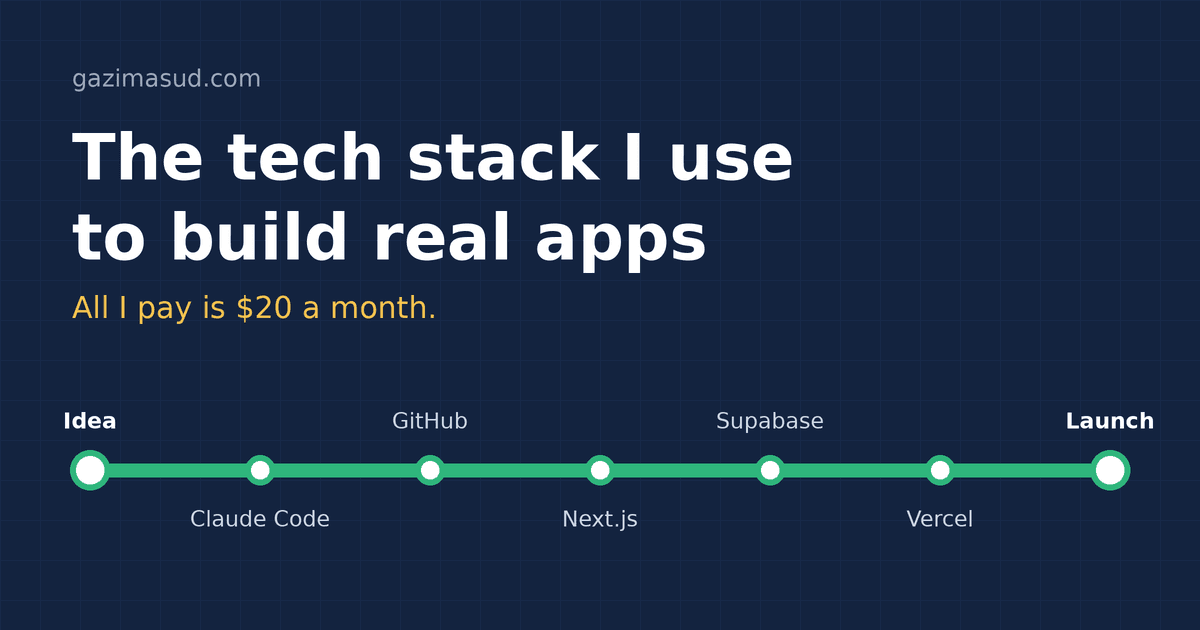
All of this is free to start. The only thing I actually pay for is Claude, $20 a month, because it comes with Claude Code.
- Claude Code — someone to write the code. Writes it, fixes it, explains it when you’re lost.
- GitHub — a place to keep your code. Saves every version. Vercel deploys straight from it.
- Next.js — web framework. Front end and back end in one project.
- Tailwind — styling. Makes things look good without messing with CSS files.
- Vercel — hosting. Push your code and it’s live.
- Supabase — database. Postgres with a dashboard you can actually understand.
- Clerk — login. Sign-up and login screens, ready to go.
- Stripe — payments. Everyone uses it for a reason.
- Resend — emails. Welcome emails, receipts, password resets.
- OpenAI, Claude, Gemini — AI inside your app. OpenAI for logic, Claude for creative stuff, Gemini when you need cheap and fast.
- Cloudflare or Namecheap — domain. Your own .com instead of a vercel.app link.
- PostHog or Vercel Analytics — analytics. So you know if anyone’s actually using it.
How it all connects, in plain words: your code sits on GitHub. Vercel grabs it and puts it online. Someone signs up, Clerk handles it. Their data goes into Supabase. They pay, Stripe takes the money and Resend emails them a receipt. And Claude Code writes basically all of it with you.
You might wonder why Clerk when Supabase already has login built in. Fair question. You don’t need both. Clerk just gives you nice login screens out of the box. If you’d rather have one less tool, use Supabase Auth and skip Clerk.
How I’d start if I were you
Don’t overthink this. It’s a weekend thing.
- Pick something tiny. One problem, one feature. A habit tracker, a link-in-bio page, some annoying thing you do every week.
- Make free accounts on GitHub, Vercel, Supabase and Clerk. Log into Vercel with GitHub so they’re connected.
- Open Claude Code and give it one clear prompt. There’s an example below.
- Build one feature, test it, commit it. Then the next one. Don’t ask AI to build the whole thing in one go, it gets messy fast.
- Deploy on Vercel. Import the repo, add your env variables, and it’s live.
- Buy a domain and connect it. Small thing, but it makes it feel real.
- Add payments only when someone actually wants to pay. Try Stripe’s test mode first.
- Share it. X, Reddit, your friends, whoever. Then watch what people do with it.
Something like this works as a first prompt:
Create a Next.js app with Tailwind. Use Clerk for login and Supabase for the database.
The app lets a logged-in user add, edit and delete daily habits and mark them as done.
Keep it simple. Explain each step, and tell me which environment variables I need.
Swap the habit tracker for your own idea and keep the rest. The “explain each step” part matters most. That’s how you actually learn while you build, instead of just copy-pasting.
What it actually costs
$20 a month for Claude. Around $10 a year for a domain. That’s it to start.
To be fair, free plans have limits. Vercel’s free plan is for non-commercial projects, so once you start charging you’ll need Pro. AI APIs charge per use too. But if you’re hitting those limits, it means people are using your thing. Good problem to have.
Stuff that will bite you
A few things to watch out for:
- Don’t paste API keys into your code. Put them in
.env.localand make sure that file never goes to GitHub. - Turn on Row Level Security in Supabase. Without it, anyone can read everyone’s data.
- Set a spending limit on your AI APIs before you launch.
- Commit every time something works. When AI breaks something (and it will), you can just go back.
- Don’t build for a month before showing anyone. Ship it ugly, fix it later.
What I’m working on right now
My first Bangladeshi project: a Dhaka Metro Rail app. Maps, routes, the stuff you actually need when you’re riding the metro in Dhaka. It’s an Android app, so this way of building isn’t only for websites.
I think it’s really cool. Have a look and tell me what you think: dhaka-metro.vercel.app/download
Just start
You don’t need a CS degree. I don’t have one. You need a small idea, $20, and a free weekend.
Most of what you build won’t take off. That’s normal. Keep building, and eventually one of them will.
If you make something with this stack, send it to me. I genuinely want to see it. And if you want more of this, I post AI and productivity builds on my YouTube channel, Gazi Labs.
Comments
No comments yet — be the first to say something.